Packstack vs. Packwizard: Which Packing App Should You Choose?
A detailed comparison of Packstack and Packwizard — two popular backpacking gear list apps — to help ultralight hikers choose the right tool for trip planning.
If you’ve spent any time in the ultralight backpacking world, you know the pre-trip ritual: weigh everything, second-guess your sleeping pad choice, rebuild the list three times, and finally arrive at a setup you’re reasonably proud of. The right packing app is the backbone of that process. Get it wrong and you’re fighting a tool that should be helping you.
For years, LighterPack was the default — still is for a lot of thru-hikers — but a new crop of alternatives has emerged that are genuinely worth considering. Two of the most talked-about are Packstack and Packwizard. They overlap in obvious ways: both are web-based, both help you build gear lists and track weight, and both let you share your setup with other hikers. But they’re built around different philosophies, and once you spend some time in each, the differences become real.
I’ll break down both tools across the dimensions that actually matter on the trail: weight tracking, gear management, sharing, mobile experience, and the question of what each app’s business model means for your workflow. My recommendation is at the end, but I’ll be honest about where each tool earns points.
What Each App Is Trying to Do
Before comparing features head-to-head, it helps to understand what each tool is actually optimizing for.
Packstack takes a trip-centric approach, organizing gear around specific adventures rather than a general inventory. That framing matters. When you open Packstack, the entry point is a trip — you’re planning a specific outing. Your gear inventory lives behind that trip, not the other way around. At its core, Packstack features a flexible, versatile gear inventory management system that makes building packing lists simple. The experience feels purpose-built for backpackers who think in terms of trips, not gear catalogs.
Packwizard leans in a different direction. Packwizard helps backpackers achieve ultralight status with tools to optimize their gear and receive lighter equipment suggestions, with a suite of gear research tools to find the lightest gear available. There’s a heavier emphasis on browsing and researching gear — it’s as much a shopping research tool as it is a packing list builder. Packwizard’s developer is building a website that will auto-populate gear for lists based on a database, keep current prices updated, and has potential for integration in other apps. That’s an ambitious vision, and it shapes the product significantly.
Neither approach is wrong. It depends on whether you’re deep in the research phase or ready to plan a specific trip. But for most working hikers, the trip-first framework Packstack uses maps more naturally to how we actually prepare.
Weight Tracking: The Core Feature
Weight tracking is non-negotiable for anyone chasing a light base weight. Both apps do it, but Packstack’s implementation is more thorough.
Packstack separates base weight, worn weight, and consumables so you always know exactly what your pack weighs on the trail. This distinction is genuinely useful. Your base weight (the pack on your back without food and water) is the number that reflects your gear setup. Consumables — food, fuel, water — change daily. Worn weight covers what’s on your body. Keeping those three buckets separate gives you a much clearer picture than a single total, especially when you’re trying to diagnose where the weight is coming from.
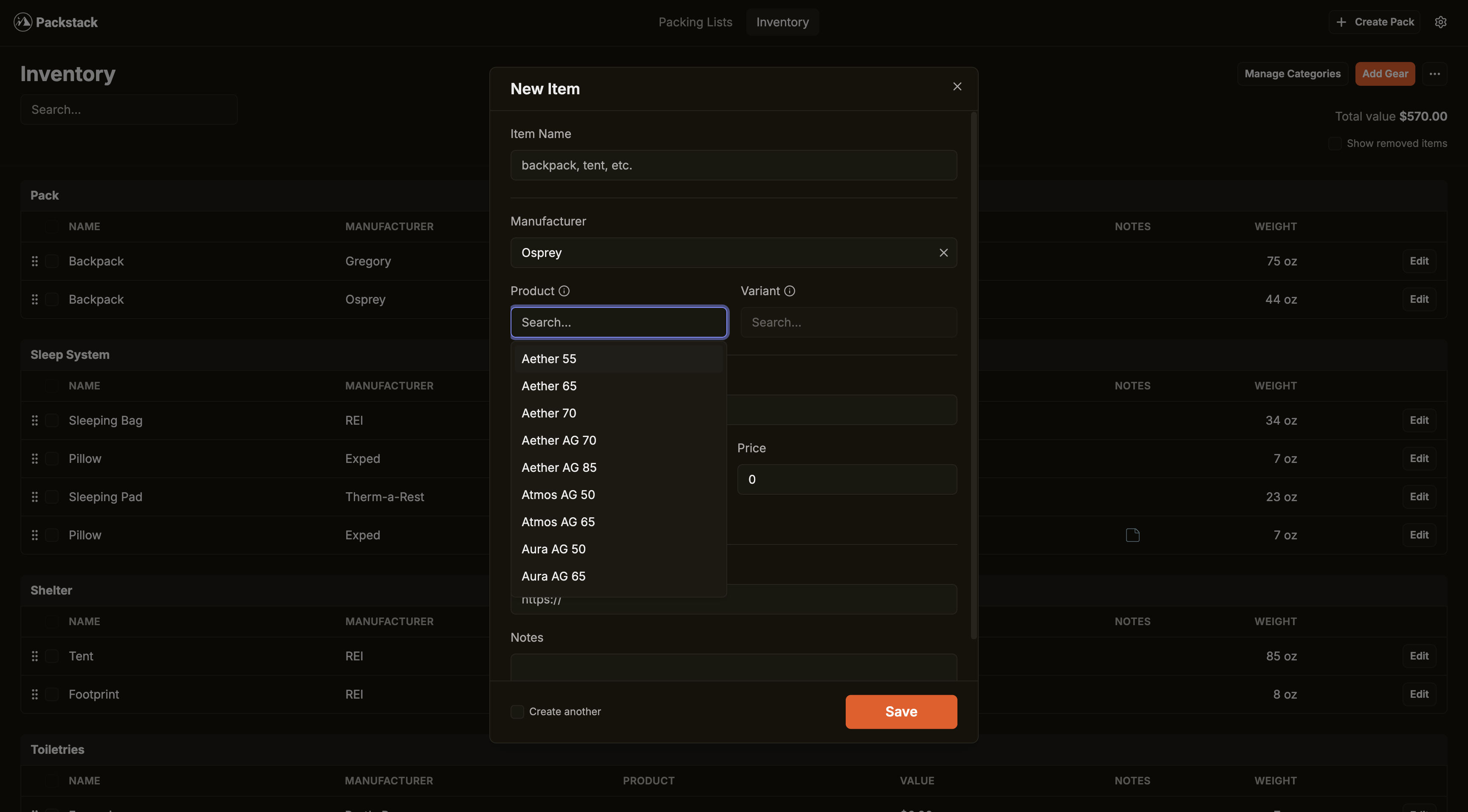
Packstack lets you build a comprehensive gear inventory with detailed specs for every item — weight, brand, product, price, and category. Every field you’d want is there: it’s easy to log a gram-scale measurement alongside the manufacturer’s listed weight, and the category system keeps things organized without being rigid.
Packwizard handles weight tracking too, and like LighterPack, it lets you create lists, see your pack weights in pie charts, and share your lists. Pie charts are fine for a high-level gut-check — seeing that your sleep system is 40% of your base weight is useful context. But pie charts aren’t where you find the inefficiencies. You find them by looking at individual item weights across categories, which both apps support.
The edge here goes to Packstack. The base/worn/consumables breakdown is a detail that most packing apps skip, and it’s one that experienced ultralight hikers will appreciate immediately.
Gear Management and List Building
How an app handles your gear inventory is where you’ll spend most of your time pre-trip — adding items, updating weights after you weigh things at home, and pulling gear into trip-specific lists.
Packstack’s inventory system is clean and frictionless. It lets you build a comprehensive gear inventory with detailed specs for every item, and your inventory is always at your fingertips when building packing lists. You add gear once, it lives in your inventory, and you pull it into any trip. Packstack also supports multiple packs per trip and both metric and imperial units. If you’re running a summer Sierra trip with a separate bear canister sub-list or a packraft setup, multi-pack support is genuinely handy.
Packwizard tries to streamline gear entry through its database autofill. It has a bigger database for autofill when adding items to your pack, and the idea is that you search for your gear by name and it populates the specs automatically. When it works, that’s faster than manual entry. The reality is that gear databases are hard to maintain — cottage industry items from brands like ZPacks, Enlightened Equipment, or Mountain Laurel Designs are often absent or outdated. One user noted the product database is a limiting factor and called it an overwhelming project.
Packwizard also uses a “Gear Closet” metaphor — you have a gear closet that can be organized into gear bins, so you don’t have to scroll through a long list of gear when building a list. That’s a reasonable UX idea, but user feedback has been mixed on the execution. One complaint is that on desktop, once the closet opens and you scroll down, the gear bin is fixed and doesn’t show much, which is a pain when trying to create a new bin or add from the bin to your pack.
Packstack’s approach is less database-dependent, which means more manual entry up front — but that’s a one-time investment. Once your gear is in, it’s in. And since you’re weighing your own gear on a scale anyway (you are doing that, right?), manual entry with your actual weights is usually more accurate than auto-populated data.
Planning Intelligence: Calorie Estimates and AI Trip Data
This is where the two apps diverge most sharply in 2026. Packwizard is focused on helping you research and buy gear. Packstack has invested in helping you plan and prepare for a specific trip — and the difference shows.
Your hiker profile stores your body stats — weight, height, age, sex, and body type — once, so every trip you plan uses your numbers instead of a generic average.
That profile feeds directly into Packstack’s calorie calculator, which uses the Pandolf load carriage equation and Mifflin-St Jeor BMR model to estimate daily calorie burn based on your body, pack weight, terrain, elevation, pace, and temperature. The calculator is available as a free public tool for anyone to use, but inside the app it pulls inputs directly from your trip details and hiker profile — no re-entering numbers. The output tells you how many calories you need per day and for the full trip, with a macro breakdown and a practical food-weight estimate (~130 kcal per ounce of typical backpacking food). That’s the kind of number that turns “I think four days of food is enough” into “I need 2.1 pounds of food per day.”
The other piece is AI-enhanced trip information. When you create a trip and set a location — say “John Muir Trail” or “Roan Highlands” — Packstack automatically researches and fills in trail distance, daily elevation gain, terrain type, expected temperature ranges, and route notes. It uses web search to pull current data, and it only fills fields you haven’t already set yourself. The practical effect is that your calorie estimates and water planning start with real numbers instead of guesses, without requiring you to spend twenty minutes on AllTrails first.
Packwizard doesn’t offer anything comparable. There’s no calorie estimation, no body profile system, and no automated trip research. That’s not a criticism of Packwizard’s goals — it’s optimizing for gear discovery — but it does mean Packstack is the significantly more capable tool once you’ve moved past the “what gear should I buy” phase into “I have a trip in two weeks and I need a plan.”
Gear Research at Scale
One area where Packwizard has traditionally had an edge is gear discovery — browsing products, comparing specs, and finding lighter alternatives. Packstack has closed that gap with its Ultralight Gear Research tool.
The tool lets you browse Packstack’s catalog of thousands of products across every gear category, sorted by weight from lightest to heaviest. You can filter by brand or weight range, toggle between metric and imperial, and expand any product to see variant weights (sizes, colors) and detailed specs like materials, R-values, packed dimensions, and temperature ratings. Each product row shows how it compares to the category median, so you can see at a glance whether that stove at 3.2 oz is meaningfully lighter than average or just slightly below the midpoint.
The key difference from Packwizard’s approach: Packstack’s gear research is purely about helping you find the lightest option. There are no affiliate links, no “buy now” buttons, and no incentive for certain products to rank higher than others. The data comes from Packstack’s enriched product catalog — the same database that powers the gear search when you’re building a pack — but surfaced in a dedicated research interface designed for comparison shopping by weight.
Sharing and Community
In the ultralight community, sharing gear lists is practically a sport. Reddit’s r/Ultralight runs on shared loadouts; people post their LighterPack links the way climbers post beta.
Packstack generates a shareable link for any trip that you can send to friends, post on Reddit, or embed in your trail journal. Recipients see a clean, read-only view of your complete packing list with weight breakdowns included. That read-only view is exactly what you want when posting for a gear shakedown — legible, professional, and no risk of someone accidentally editing your list.
Packwizard also supports public lists and has a Pack Browser feature. You can make packs public, add tags like trail name, season, or activity, and then view, filter, sort, and search public packs through the Pack Browser. That’s a nice community discovery feature if you want to browse what other people carry on a specific trail or for a specific season. It nudges Packwizard toward a social gear platform rather than a pure planning tool.
Packstack is recognized as a LighterPack alternative that lets you add your gear and start building your packing list, providing a weight breakdown to fine-tune your pack — and importantly, it has earned recognition alongside established tools in the wider backpacking resource community. One early user on Mastodon noted they were “quite impressed” — tracking all trail equipment with details like weight and manufacturer info, categorizing gear, and successfully importing a packing list from LighterPack.
Both apps support LighterPack import, which is the thing most people care about when switching. Packstack added the ability to import gear directly from LighterPack exports due to popular demand. Packwizard has had this feature since early on. Either way, you don’t have to start from scratch.
Mobile Experience and Accessibility
Here’s where the comparison has become decisively one-sided.
Packstack now has a native iOS app available on the App Store. It’s not a wrapper around a web view — it’s a full React Native app with gear inventory management, trip planning, calorie estimates, and the same weight breakdown tools available on the web. The app feels fast, the interface is designed for a phone screen, and it syncs with your web account. For the core use case — checking your list while you’re standing in your garage pulling gear, or making a last-minute adjustment at the trailhead — it’s exactly what you want.
Packwizard’s mobile story remains a real problem. Multiple users across forums have flagged it explicitly. On mobile devices, Packwizard is quite lacking, with no apparent effort to adapt the UI to a smaller screen. On an iPhone, it’s described as completely unusable — the UI suffers scaling issues and is incredibly tiny. On an iPad, it degrades quickly when the left-hand sidebar is displayed, with strange side-to-side scrolling and large blank sections.
That’s a significant gap for a tool people use during the packing process — which often happens on a phone in a bedroom or at a trailhead. Packstack’s native app puts it in a different category entirely.
Open Source and Transparency
This one matters if you care about where your data lives and whether the tool you depend on will still exist next year.
Packstack is open source software for planning backpacking expeditions. The codebase is publicly available on GitHub under an open license, which means the community can inspect it, contribute to it, and — in a worst case — fork it if development ever stalls. That’s a meaningful trust signal for a tool you’re building a gear database in.
Packwizard is not open source. That’s not inherently a problem, but it’s worth noting. Packwizard’s integration with retailer data is clearly how the developer intends to monetize the free application. Affiliate links to gear retailers are baked into the experience. The integration is described as mostly unobtrusive, and to be fair, a tool that surfaces gear suggestions with accurate pricing could be genuinely useful for someone in the research phase. But the business model does shape the product — the gear database exists partly to surface affiliate shopping links, and that colors which products get priority in the database.
Packstack’s business model is straightforward: it’s free to use with no credit card required, supported by a Patreon. No affiliate links, no monetized gear suggestions. There’s no lock-in, and you can export your gear as needed. That combination — open source, Patreon-supported, export-friendly — is about as aligned with user interests as a free tool gets.
Practical Tips
- Start with your existing LighterPack data. Both apps support LighterPack import, so there’s no reason to manually re-enter your gear inventory. Import first, clean up after.
- Use Packstack’s weight categories properly. Log your worn items (shoes, clothes) separately from your base pack weight, and flag food and fuel as consumables. Your base weight number will be much more meaningful.
- Build your inventory once, use it for every trip. Packstack’s inventory-first approach means your gear database compounds over time — each new trip, you’re just pulling from what’s already there.
- Don’t rely on auto-populated weights. Whether you’re using Packstack or Packwizard, weigh your actual gear on a kitchen scale and enter those numbers. Manufacturer-listed weights are often optimistic.
- Set up a hiker profile before your first trip. It takes thirty seconds to enter your body stats, and it feeds directly into calorie estimates. Do it once and every trip benefits.
- Let the AI fill in trip details. When creating a trip, enter the location and dates and let Packstack auto-populate distance, elevation, and temperature. You can always override the values, but it’s a better starting point than guessing.
- Use the Ultralight Gear Research tool before buying. Before you drop $400 on a tent, check the research tool to see how it compares to everything else in the category by weight. You might find a lighter option you hadn’t considered.
- Use shareable links for Reddit shakedowns. Both apps generate clean public links. Before a big trip, post it to r/Ultralight or r/WildernessBackpacking for gear feedback — you’ll get useful perspective on what you’re carrying.
Wrapping Up
Both Packstack and Packwizard are real improvements over a spreadsheet, and both are free to use. But the gap between them has widened considerably.
Packstack isn’t just a packing list tool anymore. The calorie calculator and AI-powered trip research turn it into a genuine trip planning system — one that takes your body, your gear, and your route and gives you actionable numbers for food, water, and weight. The ultralight gear research tool addresses gear discovery without affiliate incentives, letting you compare thousands of products by weight across every category. And the native iOS app closes the last significant gap that existed when we first compared these tools.
Packwizard’s gear database and Pack Browser are still interesting features, but they haven’t evolved to match. The mobile experience remains broken, there’s no trip intelligence layer, and the affiliate model continues to shape which products get surfaced. For someone purely in the gear research phase, Packwizard has some value. For everyone else — anyone who has their gear and is planning actual trips — Packstack is the more complete, more capable tool.
Sign up for Packstack, set up your hiker profile, import your existing gear, and spend the time you save re-thinking whether you really need that extra pair of camp socks.